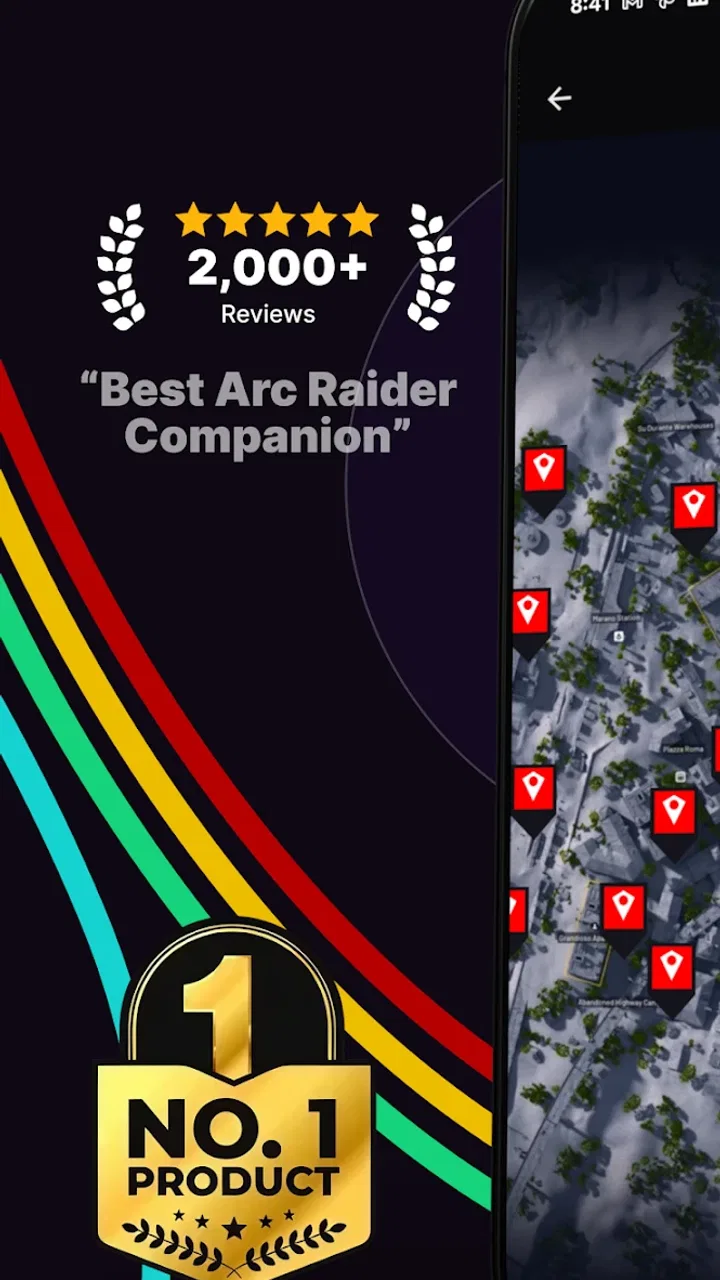
ARC Raiders - Map & Tracker
- 4.7
- Rating
- 50.00K
- Installs
- Free
- Price

 Analysis by App-foxy
When I open ARC Raiders - Map & Tracker, I am not looking for another general navigation tool. I am trying to turn scattered knowledge about ARC Raiders locations into something I can use before and during a session. That focus is the app’s biggest strength: it is built around interactive maps and community location tracking rather than everyday driving, walking, or public transport.
That makes it a very specific companion for players who want to prepare a route, check a point of interest, or compare their own discoveries with information shared by other players. I found the idea more useful than a static guide because a map gives me a spatial view of a run. Instead of reading a long page and trying to remember where everything sits, I can think in terms of nearby locations, possible detours, and the order in which I want to inspect an area.
The app is free to install, with optional in-app purchases ranging from $1.99 to $15.99 per item. It is rated for Everyone, runs on Android 7.0 or later, and is developed by brightfox. Its current version is 1.0.21, so the experience feels like a focused companion that is still establishing its place rather than a broad, mature mapping platform.
You May Also Like

 Pandora - Music & Podcasts
Pandora’s Music Is Easy to Start, but Harder to Recover
Pandora’s strength is its low-effort path from a seed to a station. Its weak spot is how much confidence it asks you to place in connection, setup, and quiet recovery.

 8 Ball Pool
 Is Built on Rivalries, Rematches, and Routine
A close look at the rivalries, rematches, shared routines, and unanswered safety questions that turn a quick pool match into a persistent mobile community.

 Samsung Music
’s Quiet Strength Is Playing What You Already Own
Its reach comes less from spectacle than from dependable access to a personal library. That simplicity is both the app’s strongest retention engine and its ceiling.

 AccuWeather: Weather Radar
AccuWeather Review: A Quick, Clear Forecast for Everyday Decisions
For everyday plans, the best forecast is the one you can understand quickly. AccuWeather makes rain timing, radar, and local conditions easy to act on, with a few trade-offs.

 Hill Climb Racing
Why Hill Climb Racing Still Turns Crashes Into One More Run
A tiny car, a bumpy hill and one more upgrade: Hill Climb Racing keeps resurfacing because its simple chaos makes every near-miss feel personal.

 AliExpress - Shopping App
AliExpress Makes Global Shopping Feel Personal, but Shoppers Bear the Risk
AliExpress turns a global marketplace into a pocket-sized discovery engine. Its reach is useful, its shopping loop compelling, and its trade-offs easy to miss.
More From Our News Desk
View All News


From a vague plan to a usable ARC Raiders route
I start with a loose question—where should I focus this session?—and use the map to turn it into a route with a clear priority and a couple of optional stops. That shift from browsing markers to making a flexible plan is what I find most useful. Next, I look at what happens when a quick check turns into a longer planning session.
Starting with the situation I actually have
The most realistic starting point is not “I want a map.” It is something more practical: I need to know what is around a particular area, I want to check a location before committing to a run, or I am trying to make sense of information someone mentioned in a community conversation. This is where the app makes sense. Its purpose is narrow enough that I can open it with a concrete question instead of wandering through unrelated tools.
I like that distinction because ordinary map apps are excellent at roads, addresses, and real-world landmarks, but they are not designed around a game’s locations. A browser search can find guides, yet the useful information may be spread across several pages, videos, or comments. A dedicated interactive map gives the task a clearer home. The benefit is not simply having a picture of the game world; it is being able to use location information as part of a decision.
My first useful habit would be to decide what I need before opening the map. If I am preparing a short session, I would look for a compact area and identify the locations that matter to that plan. If I am learning the game, I would use the map more slowly, checking how nearby points relate to one another. That small change prevents the common mistake of treating every marker as equally important.
The best way to use this app is as a planning surface, not as a replacement for game sense. A marker can tell me where something is represented on the map, but it does not automatically tell me whether reaching it is worth the time, whether the surrounding route is safe, or how conditions will feel in a live match. I still have to make those judgments inside the game.
Reading the map before I commit
Once I have a goal, the interactive format becomes more valuable than a screenshot. I can inspect the surrounding area and think about the relationship between locations. That matters when the useful outcome is not one isolated point but a sequence: start near one place, pass through another, and finish with a clear reason for being there.
A practical workflow is to begin broadly, then narrow my attention. I would first orient myself around the relevant section of the map, then inspect the markers that could influence my route. After that, I would reduce the plan to only the locations that support the session. This is more efficient than trying to memorize the entire map, and it leaves room for unexpected changes once I am playing.
One non-obvious advantage of this approach is that the map can help me spot inefficient plans before I start. A list of locations might make several objectives look equally close, while a visual layout can reveal that one choice creates an awkward backtrack. I would rather discover that while planning than after spending a match moving between points that do not fit together.
There is also a useful learning workflow here. After a session, I can return to the map and compare what I expected with what actually happened. If a location was less useful than anticipated, I can adjust my next plan. If several points worked well together, I can remember that grouping instead of rebuilding the route from scratch. The app therefore has value both before a run and during the gradual process of learning the game world.
Turning community information into a personal plan
The community element changes how I think about the map. I am not only consuming a finished guide; I am working with information that players help maintain and interpret. That can make the app more relevant than a fixed article, especially when the community has identified a location I had not considered.
At the same time, community information deserves a careful handoff from “someone marked this” to “I will build my session around this.” I would not treat every marker as equally authoritative without checking how well it fits my own experience. A location can be useful in one context and irrelevant in another. The app helps me organize the information, but I remain responsible for deciding how much confidence to place in it.
This is one of the clearest trade-offs. Community tracking can be broader and more responsive than a single author’s guide, but it may also require more judgment from me. Players who enjoy comparing observations and refining their own routes will probably appreciate that. Someone who wants one definitive answer with no interpretation may find the process less comfortable.
The handoff from phone to game
The app’s real usefulness depends on a handoff: I inspect the map on my phone, form a plan, and then carry that plan into ARC Raiders. That sounds simple, but it is where a companion app can either become part of a routine or remain something I open once and forget.
I would keep the handoff deliberately short. Rather than trying to remember every marker, I would choose a small number of meaningful destinations and note the order in which they matter. The goal is to enter the game with a flexible outline, not a rigid script. If the situation changes, I can abandon a low-priority stop without feeling that the whole plan has failed.
For players using a second device, the division is straightforward: the game stays active while the map remains available for reference. For players relying on one phone, the interruption is more noticeable. Switching away from the game to consult a map can break concentration, so the app works best when the important decisions are made before the session begins. I would not depend on constant checking during a tense moment.
That handoff also explains why the app should not be judged like Google Maps or another everyday navigation service. Those tools are designed to guide me continuously from one physical address to another. This companion is more useful when I want to prepare, understand relationships between game locations, and return to a shared reference point. The outcome is better planning, not turn-by-turn navigation.
What I get at the end of the workflow
The result I want is a clearer decision before I play. I want to know which part of the map deserves attention, which locations belong together, and which objectives I can ignore for now. If the app helps me reach that point faster, it has done its job even if I never keep it open throughout the entire session.
That makes the app particularly suitable for new players who feel lost in the game world, returning players who need to refresh their mental map, and experienced players who enjoy optimizing a route. It can also help a group prepare together: one person can inspect the map, explain the intended path, and give the rest of the squad a shared starting idea before the match.
A realistic example would be a short evening session after work. I might have limited time and no interest in spending the first match wandering. I would open the tracker, identify a manageable cluster of locations, decide which one is the main purpose of the run, and treat the others as optional stops. That gives me a plan with a clear priority and a fallback, rather than a long checklist that becomes stressful as soon as the match changes.
Another useful scenario is learning through repetition. After several sessions, I could use the map to separate what I know personally from what I have only heard from other players. That distinction is valuable: it stops community information from becoming unquestioned habit and helps me build a route based on evidence from my own play.
Where the flow breaks down
The first point of friction is the narrow audience. If I do not play ARC Raiders, this app has little reason to stay on my phone. It is not a general map, a city guide, or a replacement for a standard navigation service. Even within the game’s audience, players who prefer discovering every location without outside help may see the tracker as unnecessary.
The second issue is that an interactive community map can encourage overplanning. It is easy to spend too long studying markers and building an ideal route that the actual session will not follow. I would set a planning limit for myself: identify the main destination, choose a couple of sensible nearby options, and then stop. The app is most helpful when it reduces uncertainty, not when it becomes another task before playing.
There is also a difference between location knowledge and tactical certainty. A map can support orientation, but it cannot remove the need to react. If I expect the app to guarantee a smooth run, I will be disappointed. Its role is informational and organizational. The game still decides whether my plan survives contact with real play.
The community workflow can break in another way: information may not match my expectations. Rather than treating that as proof that the whole app is unreliable, I would use it as a reason to cross-check important decisions through my own sessions. The more costly the detour, the more cautious I would be about building the entire route around one untested point.
Finally, optional purchases may affect how different users evaluate the experience. The app is free to install, but some items cost between $1.99 and $15.99. I would begin with the free experience and only consider spending if the app becomes part of my regular routine and the purchase clearly improves the way I use it. Occasional players should be especially careful not to pay for convenience they will rarely use.
Who should use it, and who should skip it?
I would recommend it to players who want a dedicated ARC Raiders reference, prefer visual planning to scattered written guides, or enjoy contributing to and learning from community location knowledge. The combination of an interactive map and player-focused tracking gives it a clear purpose that ordinary navigation apps cannot reproduce.
I would be more hesitant to recommend it to someone who wants a completely hands-off guide. The app still asks me to interpret what I see, choose priorities, and adapt the plan. It is also not the right choice for a player who wants to remain entirely spoiler-free or who finds external planning takes away from the discovery of the game world.
The age rating of Everyone makes the app broadly accessible, and the Android requirement of 7.0 or later covers many devices. Still, compatibility alone does not decide whether it belongs in my routine. The important question is whether I regularly need location context for ARC Raiders. If the answer is yes, the focused design works in its favor. If the answer is no, a general browser or a normal map app may be more useful for everything else on the phone.
My verdict after following the complete workflow
I see ARC Raiders - Map & Tracker as a practical preparation tool rather than a constant in-game navigator. I start with a question, use the interactive map to organize locations, turn community information into a short personal route, and carry that plan into the game. The strongest outcome is a better-informed session with less aimless movement.
Its limitations are tied to the same focused design that makes it appealing. It depends on my willingness to interpret shared information, it can tempt me into overplanning, and it has little value outside ARC Raiders. Those are not minor details, but they are easy to understand before installing it.
With a 4.7 average from around 3.9 thousand ratings and more than 50 thousand installs, it has already attracted a meaningful player audience. I would judge it less by those figures than by whether its workflow fits my habits. For an ARC Raiders player who wants a visual community reference and a faster way to turn location knowledge into a playable plan, this free app is worth trying. I would simply keep the plan flexible, treat markers as guidance rather than guarantees, and let the game—not the map—make the final decisions.
FAQs for ARC Raiders - Map & Tracker
01What is ARC Raiders - Map & Tracker?
ARC Raiders - Map & Tracker is a mobile application designed to enhance your gaming experience by providing detailed maps, tracking features, and strategic insights for the popular game ARC Raiders. It offers real-time data, customizable maps, and community-driven content to help players navigate and strategize effectively within the game.
02Is ARC Raiders - Map & Tracker available for both Android and iOS?
Yes, ARC Raiders - Map & Tracker is available for both Android and iOS devices. You can download it from the Google Play Store for Android or the Apple App Store for iOS, ensuring accessibility for a wide range of mobile users. Always check for compatibility with your device's operating system version.
03Are there any in-app purchases or subscriptions in ARC Raiders - Map & Tracker?
ARC Raiders - Map & Tracker offers a free version with basic features. However, for an enhanced experience, there are in-app purchases and subscription options available. These may include premium maps, ad-free usage, and exclusive content. Users can choose to upgrade based on their preferences and needs.
04How accurate is the tracking feature in ARC Raiders - Map & Tracker?
The tracking feature in ARC Raiders - Map & Tracker is highly accurate, thanks to its integration with real-time data and community updates. It provides players with precise locations and movements within the game, making it an invaluable tool for strategic planning and execution. Regular updates ensure continued accuracy.
05Can I use ARC Raiders - Map & Tracker offline?
While some features of ARC Raiders - Map & Tracker can be accessed offline, such as pre-downloaded maps, the full functionality requires an internet connection. Real-time tracking and updates depend on live data from the servers, so an active internet connection is recommended for the best experience.
Pros
- Intuitive map interface for easy navigation.
- Real-time updates on ARC locations.
- Customizable alerts for specific areas.
- Offline mode for remote tracking.
- User-friendly design with minimal clutter.
Cons
- Requires GPS for accurate tracking.
- Limited features in free version.
- Occasional lag in crowded areas.
- High battery usage during active tracking.
- Some features require stable internet.

ARC Raiders - Map & Tracker
Gallery